Splitwise wants to totally take the stress out of sharing expenses and creating IOUs with friends. A huge part of that is facilitating communication around who owes who, and for what. We’re always looking for new ways to help you and your friends get (and stay!) on the same page.
That’s why we’re so excited to announce the release of expense comments for the web. This new feature will let group members and friends have conversations within the web app around individual expenses. We plan to bring expense comments to our iPhone and Android apps in the New Year, so you can sort stuff out on-the-go, too.
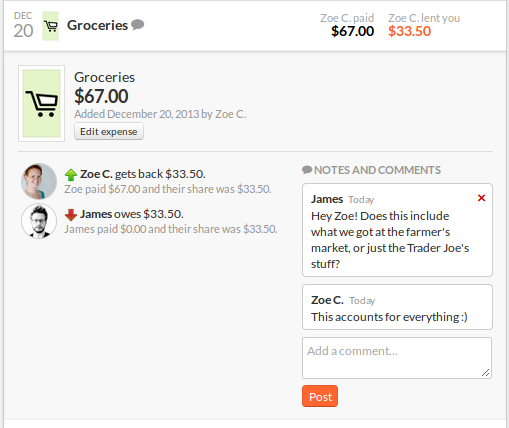
To add a comment to an expense, click on the expense name in any expense list. In the expanded view you’ll now see a ‘Notes and Comments’ box with a ‘Post’ button beneath. Simply add your questions and thoughts to the box, hit ‘Post’, and await your buddy’s response! We’ve added an email notification setting for this feature; you can choose to get an email every time someone adds a comment to an expense you’re on, or you can opt-out. The default setting has you opted-out. Head to your account settings page (‘Your Account’) to toggle.
We’ve been wanting to build out a commenting feature for quite some time, and our support requests indicated lots of users wanted it, too. We hope to make it even more rich moving forward, while preserving the simplicity Splitwise is known for. We’d love to eventually introduce a full-blown messaging feature, so you can send messages in Splitwise not attached to any expense.
As always, we’re thrilled to be steadily improving Splitwise, and so grateful that you’re here for the journey. Happy holidays!

 The Splitwise Blog
You must be logged in to post a comment.