👋 🌍 Introducing emoji support on Splitwise 🎉

Our users have been begging us to support 😈 😍 😂 input.

We👂 their 🙏 in a big way. Starting today, the Splitwise web app will be 💯 comprised of emojis. Before switching over to emoji mode, 👀  these 🔑 terms:

Expense: 📃 💸
Payment: 💴 👉
Friend: 🐶

Check out emoji mode and let us know what you think! To switch off emoji mode back to boring old English / Italian / etc, just click this link.

Wait. Seriously? 😳

✨Totally✨. Well, sort of. Happy April Fools’ Day!screenshot_20160317-172737

We are genuinely excited to announce that starting now, you can use emoji in any field on Splitwise, including:

– Expense description (🍕 $20)
– Group names (Our 🏠)
– User names (Jane Doe 👽)
– Expense comments (“Thanks for the 🍷, see you soon!”)
– The group whiteboard (“OMG our apartment is haunted 👻”)

We 💖 you and that’s no joke.
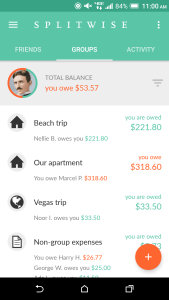
Introducing Splitwise for Android version 4.0

Screenshot_20160324-110028
This version introduces tabbed navigation, a Floating Action Button for “add bill”, and more!

Splitwise for Android Version 4.0 is the polished, powerful app our Android community deserves. We’re excited to announce that it went live in Google Play earlier today, after months of development and testing.

With this update we focused on elevating the look and functionality of the app. Google’s material design paradigm helped us build transitions, navigation patterns, and animations that make Splitwise simpler and more delightful to use. We’re thrilled to have an app that exemplifies what’s awesome and unique about Android.

In addition to these major visual changes, we concentrated on improving Splitwise’s core interactions: adding bills and checking balances. We’ve organized the new design around tabs for both individual friends and active groups, with detailed balance information visible right on the dashboard. We’ve also spent some care improving the details of the all-important “add bill” form, and squashed numerous bugs.

“Hefty Otter”, as 4.0 is known internally, was a true team effort that engaged almost every person at Splitwise. It feels amazing to share it with everyone. We can’t wait for the feedback to start rolling in so we can keep on improving.

Read on for a detailed tour of the release.

Continue reading Introducing Splitwise for Android version 4.0