Heartbleed Response

On April 7th, a major web vulnerability called “Heartbleed” was disclosed to the internet. This vulnerability affected a popular security library called OpenSSL, and as a result it affected the security of a large number of sites on the internet, including Splitwise. (A good rundown of who was affected can be found here.)

Shortly after noon on April 8th, the bug was patched on all of our servers. We also issued a new SSL certificate for splitwise.com and initiated the expiration of our old SSL certificate. As a result, we are no longer vulnerable to Heartbleed.

We have no reason to believe that any Splitwise user data was compromised via the Heartbleed vulnerability or that we were the target of an attack, but we are continuing to monitor for any unusual behavior. In addition, we’ve taken this opportunity to implement a few additional security measures, to update passwords for important server components, and to generally review how we respond to security issues.

In summary:

1. The Heartbleed bug was patched shortly after 12pm EDT on Tuesday, April 8th. We issued new a SSL certificate a few hours later, and also revoked our old certificate.

2. As a precaution, we are logging out all users who visited the Splitwise website on April 7th and 8th.

3. Changing your password is recommended as a precaution, especially for users who logged in or created an account during the affected period. You can also log out of all your existing Splitwise sessions by clicking here.

Drone Debt Collection In Partnership With Amazon And Square

The Splitwise team is excited to announce a new Settle Up option: Settle Up via drone. It’s the fastest, easiest way to collect money from your friends, no matter where they are. Plus, you’ll never need to have an awkward talk about repayment again — just send the drone and your friend will get the message that you need your money back, loud and clear.

How does it work?

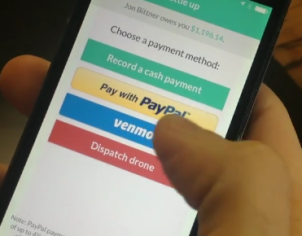
Dispatch Drone
Dispatch Drone

If a friend owes you money, ‘Dispatch Drone’ will be an option in the Settle Up flow. Tapping ‘Dispatch Drone’ automatically deploys one of our payments-processing drones, stored in Amazon warehouses across the country. Geolocators built into your friend’s Splitwise app pinpoint their exact location, sending the drone in the right direction.

Splitwise collection Drones are equipped with Square Readers, and also take cash. As soon as your friend Settles Up with the drone, the payment is recorded in Splitwise and your balance updates accordingly. Our drones are adaptive and persistent; if your friend doesn’t have any money on them, the drone follows them around in a friendly, unobtrusive manner until they have their wallet on hand.

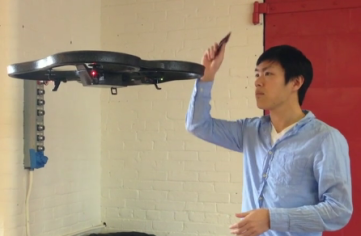
Drones are equipped with Square Readers
Splitwise Drones are powered by the Amazon Prime Cloud, are equipped with Square Readers, and also accept Cash or Bitcoin

It’s been wonderful to collaborate with Amazon and Square on this project. We’re so glad these big companies share our commitment to eliminating money stress between friends. Stay tuned for the release of our Google Glass integration, which will project a balance onto your friends’ forehead if they owe you money.

Plates Listed as #1 Best New App in Apple App Store

Plates
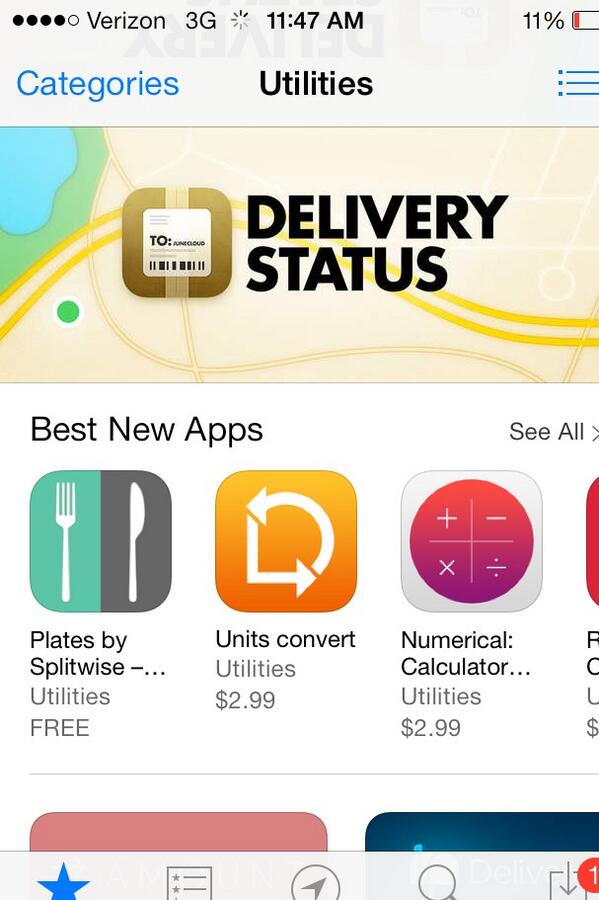
Our dinner bill app Plates featured in the App Store!

Late last night, the team was delighted to discover that our dinner bill app Plates has been listed as the #1 Best New App in the Utilities section of the Apple App Store.

We released version 1 of Plates in July 2013 to great critical and popular success; both BusinessInsider and MSN Money covered the tool, and user reviews in the App Store have been overwhelmingly positive (average rating 4.5).

This latest recognition from Apple feels amazing, and confirms our belief that we’ve made a world class app to help friends avoid awkward conversations about money after enjoying a meal together (yuck). We’re tremendously proud of our intern Liz Neu, who built Plates with limited assistance from Caleb and Ryan and has been steadily shipping updates to the app while finishing up her final year of undergrad. Most recently, Liz optimized Plates for iPad (it’s currently listed as the #2 Best New Utility App for iPad as well).

We’re incredibly grateful to all the Splitwise users who have given Plates a whirl. We look forward to providing you with ever more, ever better solutions to all of life’s splitting problems.

Free US Population Density And Unemployment Rate By Zip Code

US Census Population Density By Zip Code
Take a peek: the population, land area, and population density of every zip-code / ZCTA in the USA.
  • 2010 US Population Density, By Zip Code, in XLS and CSV
  • 2007-2011 US Unemployment Rate By Zip Code, also in XLS or CSV

Unemployment and population density are probably two of the most important local statistics you might hear quoted about a city or town. Our US Population by Zip Code post from September has gotten rather popular, and a polite commenter requested population density and unemployment rate. So here they are, totally free and in the public domain, in two different formats (see above).

How did I get this data?  Two different Census APIs (the Decennial Census 2010 and the ACS 5-year 2007-2011), combined with the square-footage by ZCTA listings from the 2013 U.S. Gazetteer Files.

I was planning to use this post to document my methods and send everyone on their own journey through the data, but it got too long and I realized that I wanted to talk a more systematic approach. In a follow up post, I will explain how to pull Census data yourself for different variables at different geographical resolution. But if you need a jump start now, my first and most helpful guide was the National Civic Day Of Hacking support slides.

Buxfer users, come join us!

Buxfer logo
If you want to switch from Buxfer to Splitwise, we’ve released an importer using their API.

In August 2012 we built an importer for Billmonk data as that service started to have problems. It helped a lot of their users seamlessly switch their expense histories and balances over to Splitwise, sparing them hours of re-entry and even worse, the horror of losing it all. We loved helping die-hard sharers find a new home, and it was a blast getting to know the Billmonk-turned-Splitwise community through the whopping 79 comments they left on our importer blog post.

We’re happy to now release an importer for Buxfer data, which we’ve developed in response to some observations about the service: The founding team appears to have moved on to Facebook, and there have been rather lengthy outages over the last year or so, with very spotty support throughout. It doesn’t seem that the site is going to close down anytime soon, but we wanted to give Buxfer users an easy way to turn over a new leaf if they felt so inclined.

If you’re a current Buxfer user and would like to get started with Splitwise, go import your Buxfer data! Or, keeping reading about the tool and co-founder Marshall’s development process below.  Continue reading Buxfer users, come join us!

Splitwise for Android v3: New Design, New Love

Splitwise Android v3 Home Screen
The new home screen! The top row lets you filter by either debts, credits, or all friends.

The whole Splitwise team is proud and thrilled to announce the release of the most wonderful Android app we’ve ever designed – Splitwise Android v3. It’s a whole new look and the result of many months of toil by Marshall, with help in the last couple months from Ryan and Caleb. Testing was carried out by the whole team as well as volunteer testers from our user base, to whom we are very grateful.

To my thumbs and eyes, our Android app has gone from a source of embarrassment to one of the most polished productivity apps in the Play Store. Some highlights from the new build:

  • Unified logo and color scheme and a look that embodies the Android style
  • Pay friends via PayPal (for US users only)
  • Simplified and streamlined “Add Bill” dialog
  • Push notifications for new expenses and edits
  • Sidebar menu to easily find balances with groups or people
  • New friend view, including both group balances and private IOUs

Continue reading Splitwise for Android v3: New Design, New Love

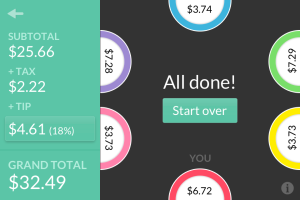
Plates by Splitwise: A Free App for Splitting Restaurant Checks

Plates iPhone app
Plates by Splitwise: Dinner bill splitting for iPhone

We are excited to announce the launch of Plates by Splitwise. Plates is a beautiful, lightning-fast, free iPhone app that calculates who owes what after a group lunch or dinner.

iPhone users, you can download it from the app store right now! (Android users, we’re working on a major update for you too).

The question of how to split a restaurant check has haunted society for generations. How many drinks did you have? Who shared those nachos? How much do I owe? Some people will want to pay for solely what they ate and drank, while others just want to split the bill equally to avoid talking about money and wrestling with mental math.

Continue reading Plates by Splitwise: A Free App for Splitting Restaurant Checks

Presenting Splitwise v3: Fat Rabbit

fat rabbit watching fat rabbit 1
Nosey is excited he is a launch mascot!

It’s my great pleasure to announce version 3  of Splitwise for iPhone and web, which Marshall has memorably code-named “Fat Rabbit.” This is a major new relaunch, which changes our look and feel and adds popularly requested features like expense search, offline mode, bill editing, and push notifications. Perhaps most notably, we’ve entered the world of “mobile payments” with iPhone payments via PayPal.

We have decided to relaunch Splitwise today, in spite of yesterday’s bombing of the Boston Marathon. We are deeply upset by the attack, and many dear friends of Splitwise were near the scene of the bombing or experienced a near miss. Our thoughts are out to anyone affected by the tragedy. In light of everything, we believe that the most ethical thing for Splitwise to do is to go ahead with business as usual.

If you care to, join us for a tour of the new app. Continue reading Presenting Splitwise v3: Fat Rabbit

Centwise, Windows Phone 7.5, Splittr Updates

Awesome Centwise feature – in app calcualtor.

To Splitwise fans using Windows Phone 7.5 or 8, the last few weeks have been really exciting. Personally, I got so excited I purchased a Lumia 620 off of eBay just so I could keep up with these two new 3rd party releases. It won’t be my primary phone, but the Metro UI is very nice.

A few days ago, Centwise (created by Kamran Ayub) released its first version for both Windows Phone 7.5 and Windows Phone 8, making it the first third party app for long-time Windows Phone 7 fans! It’s a full featured app, with group support, simple IOUs, and lots of bells and whistles. Kamran is charging $1.29 to support his efforts, but it does have a free trial and a couple unique features I really like – including the sweet calculator-within-the-add bill flow pictured at right. Check out the full Centwise feature set here.

Miron adds groups to Splittr – with pics!

Miron has been keeping the awesome updates coming at free Splittr. The 1.1 release, which hit the app store yesterday, adds totally full-featured group support, so you can see all the expenses associated with a group, group balances, and repayment instructions. One neat idea is the ability to directly pin a group shortcut to the home screen. What a cool feature – I wish I had that on Android. I’m told a Windows Phone 7.5 version is submitted to the review queue as well. As of March 26th, Splittr now also supports Windows Phone 7.5, so all Windows Phone users should have two choices – a free and a paid app. Joy of joys!

Want Splitwise on Blackberry, Symbian, your toaster? Email developers@splitwise.com and we’d love to give you early API access. Personally, I can’t wait until we have an Arduino that creates Splitwise IOUs for the office coffee jar. 🙂