We’re excited to announce that Splitwise is now supported by Zapier. This makes it easy to connect Splitwise to the other services you love, and automate certain workflows.
Good news for our Indian users – Splitwise has integrated with Paytm! Now you can repay any friend on Splitwise in seconds, using your Paytm account.
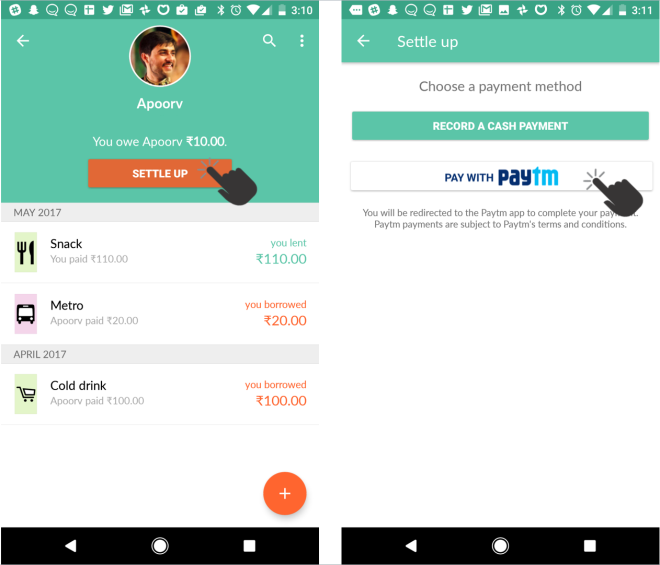
To access the integration, open a group or friendship where you owe money, tap “Settle Up”, then tap Pay with Paytm:
“Pay with Paytm” appears if you owe an Indian Rupee balance and have the Paytm app installed. Initiate Paytm payments from within Splitwise to have them be automatically recorded.
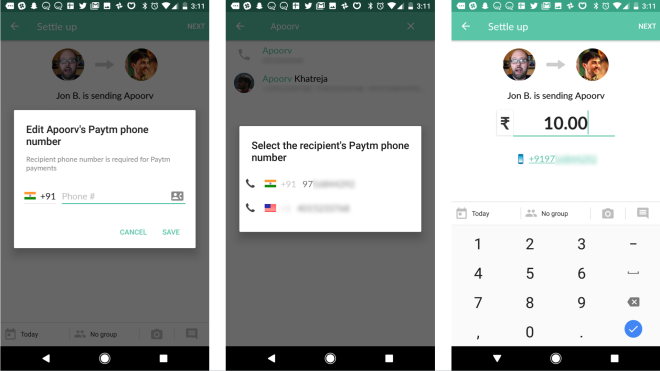
After you tap “Pay with Paytm”, Splitwise will prompt you to confirm the recipient’s phone number and the payment amount. Hitting “Next” will launch the Paytm app to complete the transaction.
You only have to confirm a phone number once for a given friend, and can use your phone contacts if you’ve given Splitwise permission to access them. To edit a friend’s Paytm phone number in the future, tap on the phone number on the confirmation screen (pictured right).
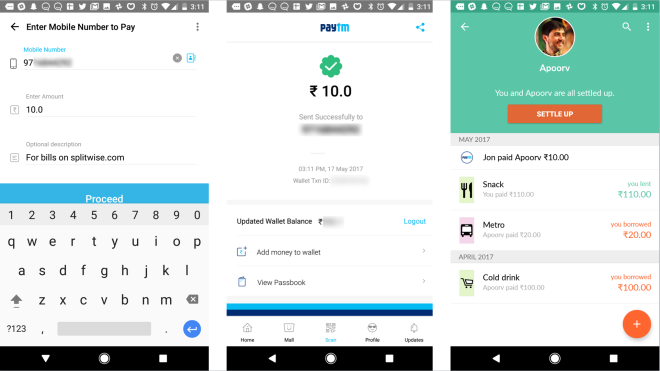
Once the payment is complete, you’ll be pushed back into the Splitwise app. Your Paytm payment will automatically be added to Splitwise and your balance will be updated.
You can tap on the payment to see your confirmation number and other details.
A few things to note about using the Splitwise Paytm integration:
You need to have the Paytm app installed on your phone. If you do not have the Paytm app, you won’t see “Pay with Paytm” when you tap “Settle Up”.
You can only settle an Indian Rupee balance (INR). If you go to settle a non-INR balance, you won’t see “Pay with Paytm”.
Only Android users using Splitwise 4.1.9 and above will be able to send Paytm payments using this integration for now.
Users on iPhone and web will be able to receive and view Paytm payments, but not send them. With Paytm’s help, we hope to bring the integration to iPhone and other platforms when we’re able.
We’re thrilled to be launching our first payment integration outside the US, and we hope Paytm support makes Splitwise even better for our users in India. To share feedback or ask questions about the integration, please send an email to support@splitwise.com – we’d love to hear from you.
Update 10:57am March 29: The Splitwise Venmo iOS integration has been re-enabled! To use it please upgrade to the latest versions of Venmo and Splitwise. If you need any assistance, please send a note to support@splitwise.com.
Update 2:55pm March 28: The iPhone integration will be re-enabled tomorrow March 29. Please make sure you’ve updated to Venmo version 7.0.1 and Splitwise version 4.4.7. If you need to Settle Up today, please log into our website (splitwise.com); the Splitwise Venmo web integration is working at this time. Or you can send your payment via Venmo directly and use our “Record a cash payment” feature to subsequently update your balance in Splitwise.
Update 9:30am March 22: Venmo is testing a release that will fix this issue.
Update 5:15pm March 21: Android Venmo payments are back to working normally.
Venmo released an iPhone update yesterday (version 7.0) that is preventing the Splitwise integration from working properly with the Venmo iPhone app. We are working with Venmo to resolve the issue and will post here with more information soon.
In the meantime, we’ve temporarily disabled the Venmo button in the Splitwise app until this is resolved (on both iPhone and Android).
Venmo payments made on the Splitwise Android app and website are not affected. Android users should have the Venmo integration re-enabled by the end of the day. If you need help with your account, please email us at support@splitwise.com. Thanks for your patience.
We’re excited to announce a new addition to our iOS app family: Splitwise for iPad! It went live on the App Store on Friday and has already earned some great reviews from the community.
Previously, iPad users could access Splitwise by using our unoptimized iPhone app, or by visiting splitwise.com in their tablet browser. Neither provided a first class experience.
We’re thrilled to finally have a specific iPad offering that takes advantage of the device’s rotation capabilities, split screen view, and increased real estate.
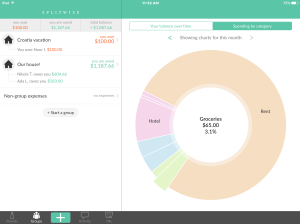
The ‘spending by category’ pie chart.
The most notable feature addition is ‘charts’: when drilled into the FRIENDS or GROUPS tabs, the right-hand view displays two spending charts: ‘your total balance’ (a bar graph) and ‘spending by category’ (a pie chart).
The ‘your total balance’ chart, which displays users’ total Splitwise balance by day, is particularly ground-breaking for us. It’s the first time we’ve calculated and displayed historical balances in Splitwise versus just the present day balance.
Another noticeable improvement is to the expense list. On iPad each expense has its full date printed to the left of the ‘description’, thanks to the extra width granted by landscape mode.
Tap on any expense to reveal ‘expense details’ in the right-hand pane; the left-hand view won’t shift at all. This means users can check many ‘expense details’ views without having to drill down, then back out, etc.
Splitwise for iPad was championed by Novall, with help from Marshall and Ryan. Novall and Marshall will be at WWDC in June; email wwdc@splitwise.com to say hi and possibly coordinate a meet-up with them! In the same vein, email googleio@splitwise.com to connect with Splitwise at the Google I/O conference later this month (Apoorv and Zoe).
We are genuinely excited to announce that starting now, you can use emoji in any field on Splitwise, including:
– Expense description (🍕 $20)
– Group names (Our 🏠)
– User names (Jane Doe 👽)
– Expense comments (“Thanks for the 🍷, see you soon!”)
– The group whiteboard (“OMG our apartment is haunted 👻”)
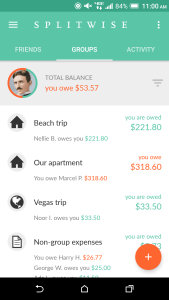
This version introduces tabbed navigation, a Floating Action Button for “add bill”, and more!
Splitwise for Android Version 4.0 is the polished, powerful app our Android community deserves. We’re excited to announce that it went live in Google Play earlier today, after months of development and testing.
With this update we focused on elevating the look and functionality of the app. Google’s material design paradigm helped us build transitions, navigation patterns, and animations that make Splitwise simpler and more delightful to use. We’re thrilled to have an app that exemplifies what’s awesome and unique about Android.
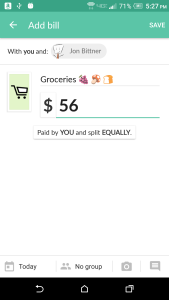
In addition to these major visual changes, we concentrated on improving Splitwise’s core interactions: adding bills and checking balances. We’ve organized the new design around tabs for both individual friends and active groups, with detailed balance information visible right on the dashboard. We’ve also spent some care improving the details of the all-important “add bill” form, and squashed numerous bugs.
“Hefty Otter”, as 4.0 is known internally, was a true team effort that engaged almost every person at Splitwise. It feels amazing to share it with everyone. We can’t wait for the feedback to start rolling in so we can keep on improving.
Splitwise for Android v 3.8 includes several improvements to the group invitation process and group member management.
1. Edit invite
Invited someone to a Splitwise group using the wrong email address? Now you can edit unclaimed invites right from ‘group settings’ so everyone can join your group with ease.
2. Resend invite
Did an invite email get lost in your friend’s swamp of an inbox? Now you can resend an invite email from ‘group settings’.
3. Balance display
Group members cannot be removed until they’re all settled up. With this release, on ‘group settings’ you’ll only see the ‘remove’ button next to a member’s name if they’re eligible for deletion. Others will have their present group balance displayed in lieu of the ‘remove’ button. This will make it easier for you to understand at a glance who can and cannot be removed from your group at any given moment.
4. Better invite by phone support for international users
Previously we were unable to pull phone numbers from ‘Contacts’ for international users. This made invite by phone number very tricky because you had to manually enter your friend’s number. Version 3.8 let’s you tap a contact entry to invite them by phone number for most international users (we are still unfortunately unable to do this for folks in France, India, and the UAE).
This version also introduces our German, Italian, and Dutch translations on Android. Many thanks are due to our volunteer translators for making this possible.
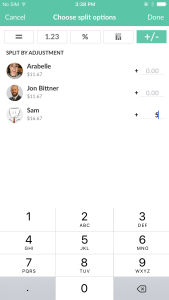
Did someone buy an extra drink at dinner? Using this new split method you can indicate “Sam owes $5 more than everyone else” and Splitwise will do the math for you.
Split by adjustment
2. 3D Touch
3D Touch is a new iPhone capability available on the 6s device. It has enabled us to implement a feature known as ‘peek and pop’.
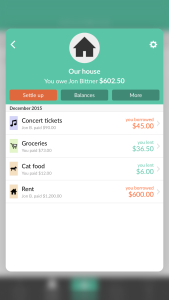
Peek and Pop: In any list view, long press the friend/group/expense name to see a preview (ie peek) of the resulting screen. To follow through to that screen (ie pop), just apply a bit more pressure with your finger.
3D Touch: Peeking at a group
3. 1Password integration
You can now sign up for and log into Splitwise on iPhone using 1Password. This will only be apparent if the 1Password app is already installed on your device.
1Password integration in Splitwise for iPhone
4. TouchID support for passcode lock
To enable TouchID support for passcode lock, first set a numeric passcode from your ‘Me’ tab in the app. Next time you launch Splitwise you will get a prompt to switch over to using TouchID for the passcode instead of the 4-digit code you created. You don’t have to switch if you don’t want to, just hit ‘cancel’ in that alert to keep using the 4-digit code you created. [NB: After setting your numeric passcode please wait at least 2 minutes before relaunching the app to switch over to TouchID]
5. New languages — Dutch, German, Italian
The new languages are available on all platforms. Special thanks to our volunteer translators for putting in a lot of hard work to get the translations ready. If you want to help us edit existing translations / translate Splitwise into new languages, just let us know!
Splitwise for Android v 3.6.5 introduces spending totals for groups. We’re thrilled about this for two reasons: one, totals have been our Android community’s most popularly requested feature for a while now. Two, it marks the first time our users are seeing Apoorv’s work in action! Apoorv Khatreja is Splitwise’s newest mobile engineer. He joined the team in October 2015 and is presently focusing on Android. We love having Apoorv on board and can’t think of a better way for our Android users to ‘meet’ him.
To access spending totals for your groups, navigate to the relevant group screen and tap the ‘vertical dots’ icon in the upper right hand corner of the group screen. Then tap ‘View spending totals’.
The resulting totals screen answers three important questions: How much did our group spend, in total? How much did I pay for, in total? And finally: How much do I owe, in total? You can see this information across three time periods: all time, this month, and last month. For now we are only summing across expenses added in your default currency. We recognize this may make the feature suboptimal for folks who are using Splitwise for foreign travel expenses. As a work-around for now you can temporarily change your default currency from your account settings screen.
Another enhancement introduced in 3.6.5 is the ability to zoom in on image uploads.


You must be logged in to post a comment.